What You Need
What will I need to get started?
Section titled “What will I need to get started?”A Google account separate from your personal account
Section titled “A Google account separate from your personal account”This helps you manage logins on many of these sites. You can use your personal account, but I don’t recommend it due to the amount of emails you will start receiving from all of these sites! To keep things clean I let all of the casinos email me on a separate account and keep my personal email elsewhere.
A password manager
Section titled “A password manager”I recommend 1Password. 1Password has been my personal password manager for a long time. They’re available on all my mobile devices and laptop, and make it so that I don’t have to keep track of dozens of passwords for all of these websites. Use Google logins when you can, and for sites that don’t offer it use strong, separate passwords created by tools such as this to protect your privacy. Signup for 1Password
Reliability is the main reason I like 1Password. I’ve used it for nearly a decade at this point, and it’s been rock-solid the whole time. It works on all my computers and mobile devices without issues.
For this hustle in particular there’s a 1Password feature I find really helpful: Type in window
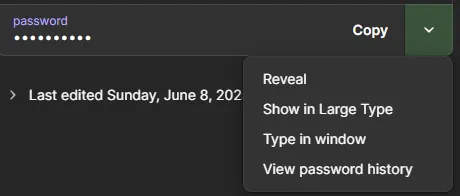
On Luckyland Slots, when I get logged out for some reason the Password box on their login screen doesn’t allow me to copy-and-paste my password. That’s super annoying since 1Password makes long complex passwords for me. However, using the Type in window option let’s me enter the password on screens like this without having to type it out by hand. Here’s how it works:
- On Luckyland, click “Login to existing account”.
- Click or Tab until your cursor is inside the Password box.
- Open 1Password.
- Go to your saved credentials for Luckyland, then on the Password box on the right, click the dropdown arrow next to “Copy”.
- Choose “Type in window”, then select the browser window with the Luckyland tab open.
- Your password should fill into the field on Luckyland. Click Login and grab your daily bonus!
That little trick saves me a good 1-2 minutes per day, and that savings adds up over time.
A valid photo ID
Section titled “A valid photo ID”This ID can be a drivers’ license or a passport. Make sure you have the physical ID with you since you will need to take a LOT of pictures of it to get validated on all of the websites.
One of the KYC verification vendors you will work with is called Sumsub. I highly recommend letting Sumsub store your validation under your email. After the first time validating through them future validations on other sites go MUCH faster.
Pictures
Section titled “Pictures”- A selfie of you holding your ID
- The front of your ID
- The back of your ID
- A picture of the physical credit card you are using to make purchases with only the first six and last four numbers of the card visible.*
- A separate email (or email address you’re OK with being spammed dozens of times per day)
- This is a specific requirement you will see on several websites on part of their verification processes.
Bank statements
Section titled “Bank statements”If you are going to redeem to a Checking account, have a scan of a recent bank statement which shows the account number on it. Some sites will also take a picture of a voided check. This will need to be at most six months old or most sites will not accept it.
Utility bill (or other proof of address)
Section titled “Utility bill (or other proof of address)”Prepare to have some form of proof of address document in PDF format. If it’s a utility bill it needs to be dates within the last 3 months.
A Bitcoin wallet
Section titled “A Bitcoin wallet”Some sweeps sites pay out in Crypto, so you will want a virtual wallet that can accept these funds. I use Coinbase.
Keep in mind that Crypto values can fluctuate rapidly, so be careful not to convert into USD during a downswing, and stay away from less popular types of Crypto. I stick with Bitcoin and would be comfortable taking funds in Etherium as well.
You MIGHT also need…
Section titled “You MIGHT also need…”A separate credit card.
Section titled “A separate credit card.”While most credit card companies will process sweeps purchases just fine, some (like Capital One) will give you trouble. Save yourself the headache and get a separate card that will handle these purchases and give you cash back for using them.
I also like having a separate credit card for this hustle to help me keep track of my purchases. I can use my spreadsheet and match it against my credit card statement to see if anything was missed or double-charged.
VPN = Virtual Private Network. I run into issues where, even though I live in an unrestricted state, I still get notices like these:
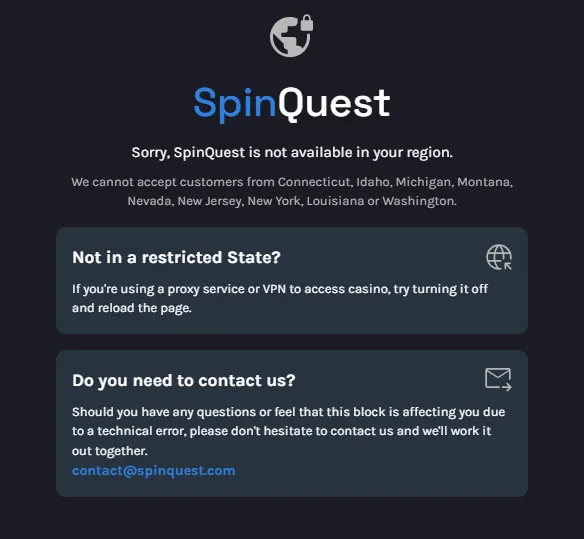
Why? Because I’m using Google Fiber my machine has a dynamic IP address. IP addresses are tied to specific locations, and Google doesn’t always give me addresses that are in my state! Sometimes restarting my machine helps, but to permanently solve this problem I had to sign up for a VPN service to give me a dedicated IP address to work from.
I recommend Mullvlad VPN. Out of all the VPN services I like the privacy that this one provides. You don’t need to tie your Mullvlad account to a credit card or ID, and they have been verified to NOT keep records of your web traffic. This is as private as it gets for commercial VPNs, and that’s why I trust them with my business.